Mad Lib: A mini Python project
Few words on output and input files
Here's a small video clip showing the output. I am using powershell to navigate to a folder saved on my desktop and running the Python file titled MadLib inside powershell.
To begin with we used "Romeo Juliet Prologue : AD-LIB" from https://www.madtakes.com/libs. Please feel free to choose any catchphrase of your choice or make one. Following two pictures show the key words required to be input by user and how they show up in the Mad Lib returned by Python when the function runs.
 A screenshot from madtakes.com showing the required input from the user.
Please note the sequence. We can seek user input in python in any order but we will be following this sequence while placing these words in the generated Mad Lib. More on it in a while.
A screenshot from madtakes.com showing the required input from the user.
Please note the sequence. We can seek user input in python in any order but we will be following this sequence while placing these words in the generated Mad Lib. More on it in a while.
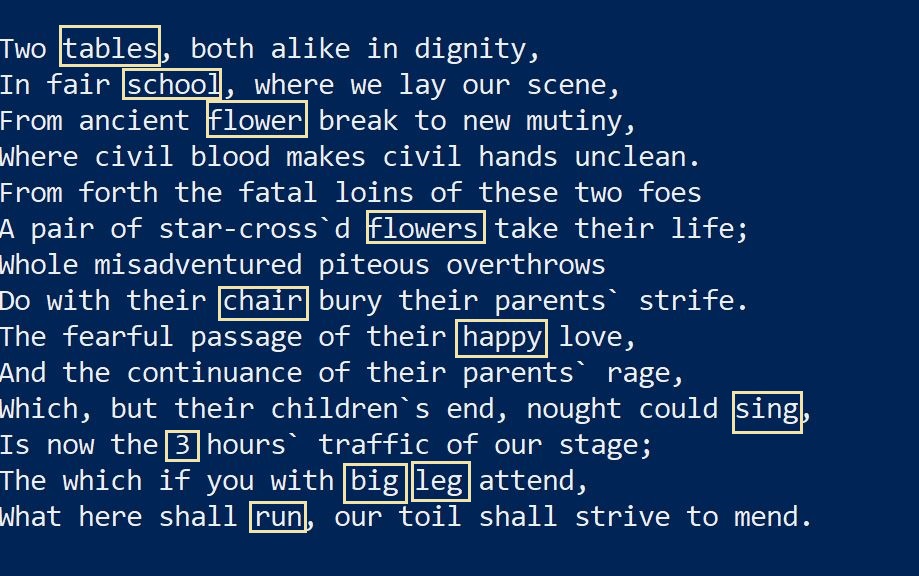 Output Mad Lib generated by Python. We got the phrase from madtakes.com by generating Mad Lib after submitting the input vlaues.
Code
Alright! let's dive in the shallow waters of a simple code. First we define a variable story which contains the exact Mad Lib phrase as in the above picture. Please note that 'story' is a multi line string so we are enclosing it in three quotes ('''). Please note the use of curly bracket {} in place of words that will be sought through user input. These are the words you see enclosed in yellow rectangles on the picture above.
story = '''
Two {}, both alike in dignity,
In fair {}, where we lay our scene,
From ancient {} break to new mutiny,
Where civil blood makes civil hands unclean.
From forth the fatal loins of these two foes
A pair of star-cross`d {} take their life;
Whole misadventured piteous overthrows
Do with their {} bury their parents` strife.
The fearful passage of their {} love,
And the continuance of their parents` rage,
Which, but their children`s end, nought could {},
Is now the {} hours` traffic of our stage;
The which if you with {} {} attend,
What here shall {}, our toil shall strive to mend.
'''
 There's a reason for repeating this picture here. We will seek these values from user using input method in Python. Following line of code seeks input and assigns it to variable named place.
place = input('Enter a location (e.g., London or school): ')
We can change the input method for the variables that are sought more than once. For example there are two Singular Nouns, equal number of Plural Nouns and Verbs. We can define Singular Noun as an empty list and use append method to assign input to values to the empty list. We can then recall these values using List[item] method. Following example elaborates it further.
singular_nouns = []
singular_nouns.append(input('Enter a singular noun (e.g., chair): '))
singular_nouns.append(input('Enter another singular noun (e.g., table): '))
Following is the complete code for seeking input on all 11 values with six values combined into three lists. Please note the input does not follow the sequence in which these will be placed in our Mad Lib rendered by Python.
singular_nouns = []
singular_nouns.append(input('Enter a singular noun (e.g., chair): '))
singular_nouns.append(input('Enter another singular noun (e.g., table): '))

plural_nouns = []
plural_nouns.append(input('Enter a plural noun (e.g., chairs): '))
plural_nouns.append(input('Enter another plural noun (e.g., tables): '))

adjectives = []
adjectives.append(input('Enter and adjective (e.g., big): '))
adjectives.append(input('Enter another adjective (e.g., happy): '))

verbs = []
verbs.append(input('Enter a verb (e.g., run): '))
verbs.append(input('Enter another verb (e.g., play): '))

place = input('Enter a location (e.g., London or school): ')
number = input('Enter a number (0 - 9): ')
body_part = input('Enter a body part (e.g., arm): ')
Next we will apply .format function to story variable listing the input variables. Please note that input variables here appear in the exact same sequence in which these will appear in place of curly bracket {} in the story string. Following code applies the format function to story and assigns it to a new variable mad_lib.
mad_lib = story.format (plural_nouns[0],
                        place,
                        singular_nouns[0],
                        plural_nouns[1],
                        singular_nouns[1],
                        adjectives[0],
                        verbs[0],
                        number,
                        adjectives[1],
                        body_part,
                        verbs[1])
In the end we need to print(mad_lib). To be able to do that we will wrap all input values, the mad_lib variable and print(mad_lib) in a function called main and will call main() Here's the full code ....
story = '''
Two {}, both alike in dignity,
In fair {}, where we lay our scene,
From ancient {} break to new mutiny,
Where civil blood makes civil hands unclean.
From forth the fatal loins of these two foes
A pair of star-cross`d {} take their life;
Whole misadventured piteous overthrows
Do with their {} bury their parents` strife.
The fearful passage of their {} love,
And the continuance of their parents` rage,
Which, but their children`s end, nought could {},
Is now the {} hours` traffic of our stage;
The which if you with {} {} attend,
What here shall {}, our toil shall strive to mend.
'''

def main():

    singular_nouns = []
    singular_nouns.append(input('Enter a singular noun (e.g., chair): '))
    singular_nouns.append(input('Enter another singular noun (e.g., table): '))

    plural_nouns = []
    plural_nouns.append(input('Enter a plural noun (e.g., chairs): '))
    plural_nouns.append(input('Enter another plural noun (e.g., tables): '))


    adjectives = []
    adjectives.append(input('Enter and adjective (e.g., big): '))
    adjectives.append(input('Enter another adjective (e.g., happy): '))

    verbs = []
    verbs.append(input('Enter a verb (e.g., run): '))
    verbs.append(input('Enter another verb (e.g., play): '))

    place = input('Enter a location (e.g., London or school): ')
    number = input('Enter a number (0 - 9): ')
    body_part = input('Enter a body part (e.g., arm): ')

    mad_lib = story.format (plural_nouns[0],
                            place,
                            singular_nouns[0],
                            plural_nouns[1],
                            singular_nouns[1],
                            adjectives[0],
                            verbs[0],
                            number,
                            adjectives[1],
                            body_part,
                            verbs[1])
    print(mad_lib)

main()
Enjoy! p.s. Inspired from python video series by KnightLab (available on youtube : https://www.youtube.com/playlist?list=PLhP5GzqIk6qsYjU_3tod0nqoWGXlq9RvF) I am a newbie to developing and this is my first blog. Please do highlight the mistakes for correction and my learning.